
Designing a Platform Framework for AI-Driven Content:
Auto Management Chassis
ROLE:
Product designer
DURATION:
Ongoing
Product Showcase


Introduction
As AI expanded across Oracle’s enterprise products, teams needed a consistent way to surface insights, guide decisions, and enable action. I helped design the Auto Management Chassis (AMC), a reusable UX framework that defines how AI agents, data, and users interact across products.

Problem
What wasn't working
EPM products were powerful, but structurally broken. Information hierarchy was inconsistent across pages, visual systems lacked clarity, and core workflows were scattered across dashboards, grids, and reports that did not connect. Navigating the system required users to reconstruct context on their own.
The experience felt fragmented, visually outdated, and difficult to reason about at scale.

Users were not operating within a system. They were navigating disconnected tools.
There was no clear entry point, no consistent flow, and no shared logic across applications.
AI did not solve this. It made it worse.
Most AI features were implemented as static thresholds or alerts. They flagged anomalies but did not explain them, guide decisions, or enable action.

We reframed the challenge
Design a unified chassis that restructures hierarchy, standardizes experience patterns, and transforms AI from passive signals into actionable briefings that drive planning and execution.
Design Challenge
The problem was not just fragmented UX or weak AI. It was the absence of a shared structure across EPM products. Any solution needed to fix hierarchy, standardize experience patterns, and introduce AI in a way that users could understand and act on.
This meant designing both a platform foundation and a new interaction model for AI.
We had to solve for multiple tensions at once:
-
Standardize hierarchy without limiting product flexibility
-
Introduce AI without adding noise or distraction
-
Move from alerts and thresholds to meaningful, actionable insights
-
Connect analysis, explanation, and planning into a single flow
The goal was not to add another layer. It was to redefine how the system works.
Why this works
-
It builds directly on “EPM is broken”
-
It elevates the work from UX cleanup to system redesign
-
It clearly frames AI as part of the solution, not the center
-
It introduces tension, which makes your decisions later feel intentional

System Design (AMC Framework)
A unified system to structure every finance experience
To fix fragmentation, we designed AMC (AutoManagement Chassis) as a shared framework that standardizes how users navigate, understand insights, and take action across all finance products.
AMC is not a single interface. It is the structure behind every interface. It defines how experiences behave across multiple ERPM applications.

Built around real workflows
Finance teams operate in a continuous loop of monitoring, analyzing, and acting. We aligned the system to this cycle so experiences feel intuitive and decision-driven.
The system reflects how decisions happen, not how data is stored.
Three surfaces anchor the system
To create consistency across applications, we defined three persistent entry points:
-
Overview for signals and AI insights
-
Inbox for triage and prioritization
-
Catalog for access to data and workflows
Users no longer relearn navigation. They operate within a shared model.

From insight to action in one flow
Explorer acts as the AI workspace where users move from insight to resolution without losing context.
-
Combines chat with structured artifacts
-
Supports analysis, simulation, and execution
Insight, reasoning, and action are unified in a single experience.
From system to solution
Instead of starting with low-fidelity wireframes, we designed directly using Redwood patterns and reusable components.
We designed the system the same way it would be built.
Scaling through shared patterns
Consistency was critical. We worked across teams to define which patterns should be standardized and where flexibility was needed.
The challenge was not creating patterns. It was negotiating them. Each decision balanced local product needs with overall system coherence.
Designing insights as narrative, actionable systems
Traditional EPM insights were static. They flagged thresholds or anomalies but did not explain why they mattered or what to do next.
We redesigned insights as narrative objects that evolve with context and guide users toward action.
-
Each insight includes a clear signal, explanation, and implication
-
Context is introduced through structured briefings
-
Actions are embedded directly within the insight
-
Content adapts based on data, filters, and user focus
An insight is not a notification. It is the starting point of a workflow.

Insights as the bridge across AMC
Insights connect every part of the system. They are not confined to a single page.
-
Overview surfaces signals that require attention
-
Inbox organizes and prioritizes them
-
Explorer expands them into investigation and reasoning
-
Planning flows turn them into action
Insights are the connective layer between awareness, analysis, and execution, they move users through the system without breaking context.
Key design decisions
Overview as the signal layer
The Overview page surfaces the most important changes in the business through AI-generated insights and key metrics. It acts as the entry point where users understand what requires attention.
Users do not start with data. They start with signals that demand action.

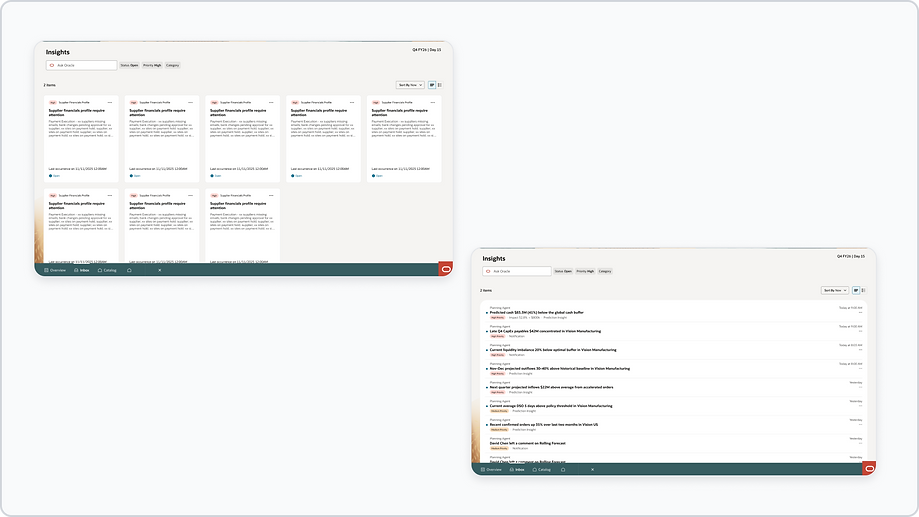
Inbox as the coordination layer
The Inbox centralizes insights, notifications, and messages in a single place where users can review, group, and prioritize what requires attention.
Rather than scattered alerts across the system, everything is organized into a unified stream tied to ongoing workflows.
Catalog as the access layer
Catalog provides structured access to dashboards, planners, and reusable objects across the system. It allows users to navigate directly to specific tools while staying within the same interaction model.
It ensures that exploration and action are always connected to the broader system.

Explorers as the reasoning and action environment
Insights do not live in isolation. Opening an insight transitions users into Explorer, where the full context is expanded and acted upon.
Each insight begins with a briefing that explains what is happening, why it matters, and what can be done next.
From there, users can:
-
Ask follow-up questions
-
Use recommended prompts
-
Investigate drivers and assumptions
-
Move into planning and execution
Explorers are where insights become decisions, they connect explanation, interaction, and action in a continuous flow.

Temporary workspaces for execution
Not all work happens in persistent screens. When deeper interaction is needed, users move into temporary workspaces accessed through Catalog and Explorer.
These include:
-
Workbooks
-
Planners
-
Grids and worksheets
-
Datasets and detailed views
These spaces allow focused interaction without breaking the overall flow. They appear when needed and disappear when done.

System in action
From signal to action in one flow
Users start with insights in Overview or Inbox, then move into Explorer where a briefing explains the situation and suggests next steps.
From there, they can ask questions, explore drivers, and take action without leaving context.

A workspace that adapts to the user
Explorer combines conversational interaction with structured outputs like tables, forecasts, and scenarios.
As users interact, the workspace evolves to support deeper analysis.
Focused work, without fragmentation
When deeper interaction is needed, users move into temporary workspaces such as planners, grids, or workbooks, all connected to the same flow.
Expected results
Faster, more focused decision-making
By surfacing signals first and connecting them directly to action, users spend less time navigating and more time resolving issues.
From reactive alerts to actionable insights
Insights provide context, explanation, and next steps, enabling users to move from awareness to execution without friction.
A foundation for AI-driven experiences
AMC enables AI to operate as part of the workflow, supporting continuous reasoning, exploration, and planning.